7 Payroll Mistakes That Lead to HMRC Fines [And How to Avoid Them]
Running payroll in the UK means operating PAYE, filing Real Time Information on time, deducting the right taxes, and enrolling staff into a workplace pension — and HMRC can fine you for getting any of it wrong. Research shows that four in ten UK SMEs have already been penalised for payroll errors, with fines ranging from £100 per missed filing to £10,000 per day for auto-enrolment failures. This guide covers the seven most common payroll mistakes that trigger HMRC penalties, including wrong tax codes, late RTI submissions, incorrect wage calculations, and missed year-end deadlines. Each mistake is explained with the actual penalty amount and a clear fix. If you run payroll for even one employee, these are the errors you cannot afford to make.
![7 Payroll Mistakes That Lead to HMRC Fines [And How to Avoid Them]](/_next/image?url=https%3A%2F%2Fi.imgur.com%2FmajxLbE.jpeg&w=2048&q=75)
7 Payroll Mistakes That Lead to HMRC Fines (And How to Avoid Them)
Running payroll in the UK is not optional. If you employ people, you are legally required to operate PAYE, report to HMRC in real time, deduct the right taxes, enrol eligible staff into a pension, and file everything on time. Get any of those wrong and HMRC can fine you — sometimes automatically, sometimes heavily, and sometimes repeatedly until you fix the problem.
The frustrating reality is that most payroll fines are not caused by deliberate non-compliance. They are caused by mistakes. Small, avoidable, often preventable mistakes that happen because the business owner was busy, the process was manual, the tax code was wrong, or nobody realised the deadline had passed until the penalty letter arrived.
Research from 2025 found that four in ten UK SMEs had been penalised for payroll errors. That is not a fringe problem. That is nearly half the small business population. The penalties ranged from fixed fines of £100 per missed filing to percentage-based charges running into thousands of pounds for persistent late payment of PAYE.
This guide covers the seven most common payroll mistakes that lead to HMRC fines, explains the actual penalty amounts for each one, and shows you exactly how to avoid them. Whether you run payroll yourself or outsource it, understanding these errors is the difference between a clean compliance record and an unnecessary bill from HMRC.
Every mistake in this article has a known HMRC penalty attached to it. Every mistake is also preventable. The businesses that avoid payroll fines are not the ones with the biggest finance teams. They are the ones with the right systems and the right habits.
How HMRC payroll penalties work
Before looking at the individual mistakes, it helps to understand how HMRC structures payroll penalties. There are broadly three types of penalty that affect small businesses.
| Penalty type | How it works | Typical range |
|---|---|---|
| Late filing penalties | Fixed monthly fines for each late Full Payment Submission (FPS), scaled by the number of employees. | £100 to £400 per month |
| Late payment penalties | Percentage-based charges when PAYE, NIC, or Student Loan deductions are paid late to HMRC. | 1% to 4% of the amount unpaid, escalating with repeated lateness |
| Inaccuracy penalties | Charged when errors in submissions lead to incorrect tax being reported. Penalty depends on whether the error was careless, deliberate, or concealed. | 0% to 100% of the potential lost revenue |
| Auto-enrolment penalties | The Pensions Regulator (TPR) issues fixed and escalating daily penalties for failing to meet workplace pension duties. | £50 to £10,000 per day depending on employer size |
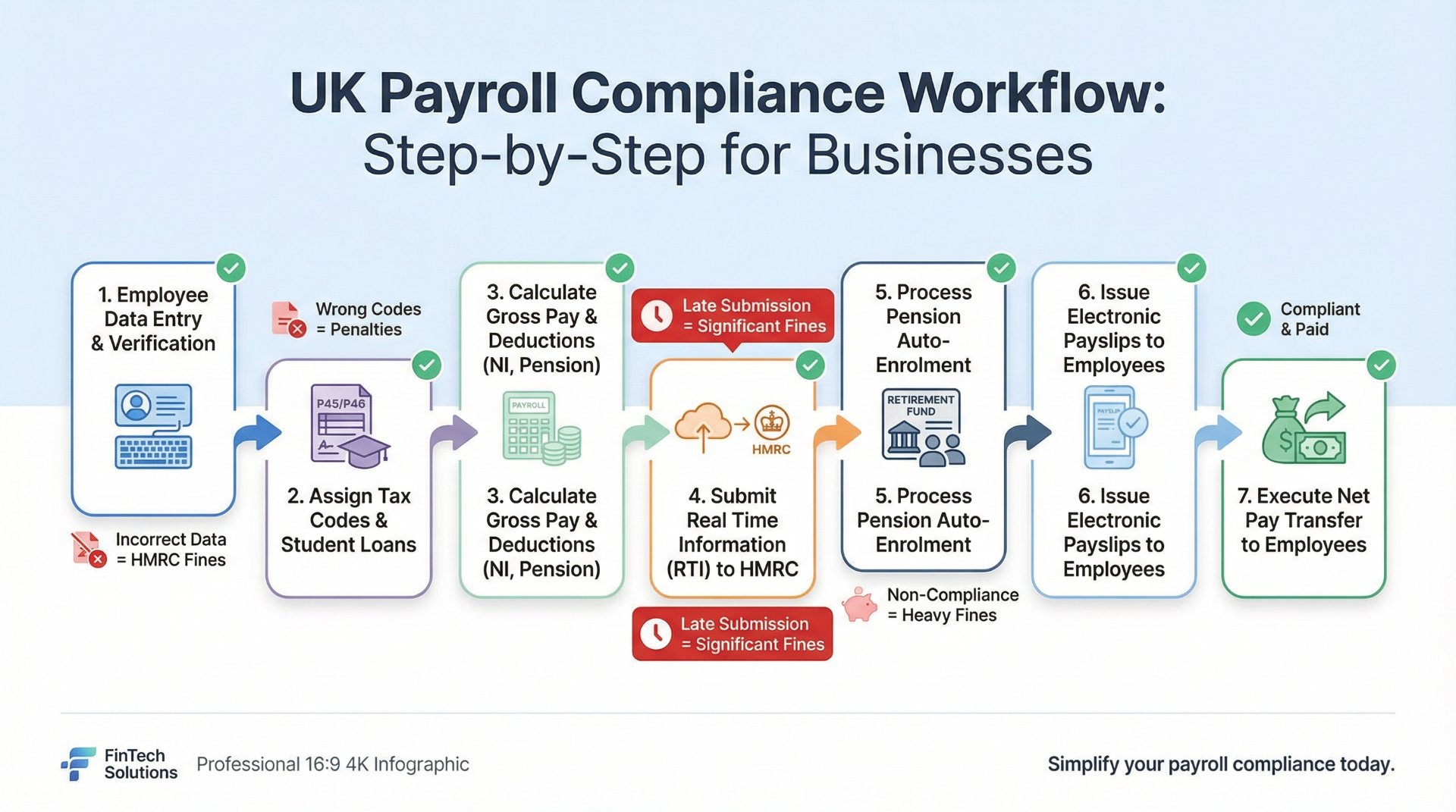
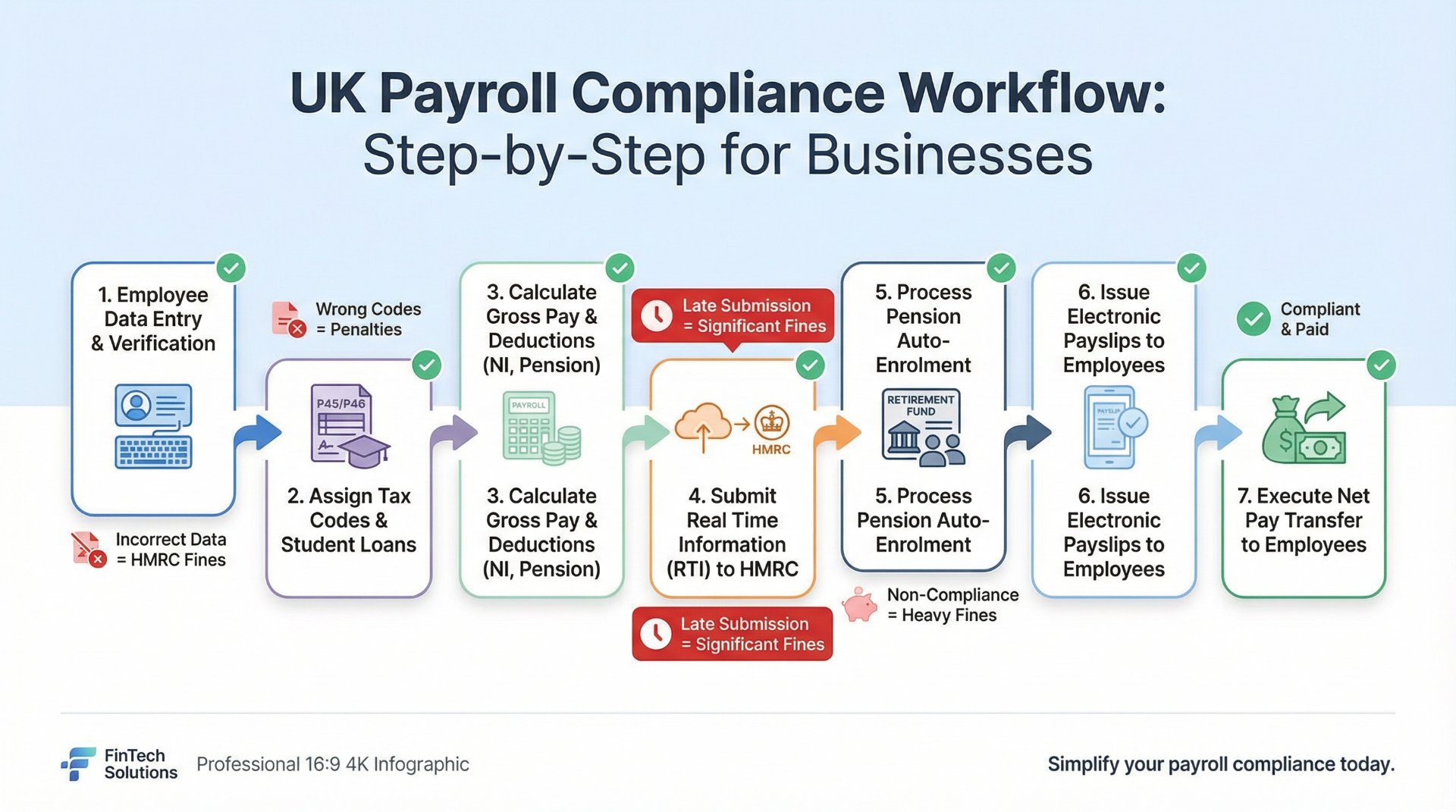
HMRC generally does not fine employers for the first late FPS in a tax year. That is a one-time grace. But from the second late submission onward, penalties apply automatically and accumulate monthly. Late payment penalties follow a similar escalation model — the more times you pay late in a tax year, the higher the percentage charge becomes.
Understanding this structure makes each of the seven mistakes below much more concrete. These are not theoretical risks. They are specific triggers for specific fines.
The seven mistakes
Using wrong tax codes for employees
Tax codes determine how much Income Tax is deducted from each employee's pay. A wrong tax code means the wrong amount of tax is taken — either too much or too little. Both create problems, but underpaying is where HMRC penalties become a real risk.
Wrong tax codes happen for several reasons. HMRC issues new codes at the start of each tax year and sometimes during the year, but employers do not always apply them correctly. New starters are sometimes put on emergency tax codes and then left on them for months. Employees with multiple jobs, benefits in kind, or student loans can have more complex codes that are easy to misapply. And manual payroll processes make it far too easy to type the wrong code and not notice until the year-end reconciliation reveals a discrepancy.
When an incorrect tax code leads to an underpayment of tax, HMRC may pursue the shortfall from the employer rather than the employee. If the error is classified as careless, an inaccuracy penalty of up to 30% of the underpaid tax can be charged on top of the amount owed. If HMRC considers the error to be deliberate, the penalty can reach 70%, and if it was deliberate and concealed, it can reach 100%.
Even when the error does not lead to a formal penalty, it creates extra administrative work: amended submissions, recalculations, and potentially difficult conversations with employees who have been over- or under-taxed.
HMRC penalty: Inaccuracy penalties of 0% to 30% for careless errors, up to 70% for deliberate errors, and up to 100% for deliberate and concealed errors — calculated on the potential lost revenue caused by the incorrect tax code.
How to fix it: Always apply HMRC-issued tax code notices (P9 coding notices) promptly when they arrive. Use payroll software that automatically updates tax codes when HMRC sends digital notifications. For new starters, use the starter checklist to determine the correct code rather than defaulting to emergency tax. Review all employee tax codes at the beginning of each tax year. If you are unsure about a code, check with HMRC or your accountant before running payroll.
Late Real Time Information (RTI) submissions
Since RTI was introduced, UK employers must report payroll information to HMRC every time they pay their employees, on or before the payment date. This is done through a Full Payment Submission (FPS). If you pay monthly, you submit an FPS every month. If you pay weekly, you submit one every week.
Late FPS submissions are one of the most common causes of payroll fines in the UK. The penalty structure is straightforward and automated. HMRC charges a fixed amount for each month (or part of a month) that an FPS is late, and the amount depends on how many employees you have.
| Number of employees | Monthly late filing penalty |
|---|---|
| 1 to 9 | £100 |
| 10 to 49 | £200 |
| 50 to 249 | £300 |
| 250 or more | £400 |
These penalties accumulate. If a small business with five employees files late three months in a row, that is £300 in fines — for doing nothing more than missing a submission date. And if you also fail to file for 12 months or more, HMRC can charge an additional penalty of 5% of the tax and NIC that should have been reported.
The most common reason for late submissions is that the employer simply did not realise the deadline had passed. When payroll is run manually or managed in spreadsheets, there is no automatic prompt to file. The date slips, the submission does not happen, and the penalty arrives weeks later.
HMRC penalty: £100 to £400 per month for late FPS filings, plus an additional 5% charge if filing is more than 12 months late. First late submission in a tax year is usually not penalised.
How to fix it: Use payroll software that submits the FPS to HMRC automatically as part of the pay run. This eliminates the risk of forgetting because the submission happens at the same time as the payroll calculation. Set calendar reminders as a backup. If you cannot submit on time for a genuine reason, file an Employer Payment Summary (EPS) by the 19th of the following month to explain why. Never assume HMRC will not notice a missed submission — the system flags late filings automatically.
Incorrect wage and deduction calculations
Getting the numbers wrong is more common than most employers realise, and it goes beyond simple arithmetic. Incorrect calculations can involve applying the wrong National Insurance category, miscalculating overtime or holiday pay, not accounting for salary sacrifice correctly, deducting the wrong student loan repayment amount, or failing to apply the correct minimum wage rate.
The National Living Wage for workers aged 21 and over is £12.21 per hour from April 2025. For apprentices, the rate is £7.55 per hour. Underpaying the minimum wage — even unintentionally — is an offence. HMRC can issue a penalty of up to 200% of the total underpayment, up to a maximum of £20,000 per underpaid worker. The employer must also pay all arrears owed to the affected employees.
Other calculation errors are penalised under the inaccuracy framework. If incorrect wage or deduction figures lead to the wrong amount of PAYE or NIC being reported to HMRC, the employer may face an inaccuracy penalty on top of any underpaid tax.
These errors often cascade. A wrong gross pay figure leads to wrong tax, wrong NIC, wrong student loan deductions, and wrong pension contributions — all from a single input error. When payroll is done manually, one typo can create five separate compliance problems.
HMRC penalty: Up to 200% of total underpayment for National Minimum Wage breaches (max £20,000 per worker). Inaccuracy penalties of up to 30% for careless calculation errors affecting PAYE or NIC.
How to fix it: Use payroll software that calculates gross-to-net pay automatically, including tax, NIC, student loans, pension deductions, and statutory payments. Review the National Living Wage and National Minimum Wage rates at the start of each April when they change. Double-check overtime calculations, especially for workers near the minimum wage threshold where overtime at the wrong rate could push effective pay below the legal minimum. Run a pre-submission review of every pay run before filing.
Missing auto-enrolment duties
Workplace pension auto-enrolment is not optional. Every UK employer must automatically enrol eligible workers into a qualifying pension scheme. Eligible workers are those aged between 22 and State Pension age who earn more than £10,000 per year. The minimum contribution is 8% of qualifying earnings, with the employer paying at least 3% and the employee paying at least 5%.
The penalties for failing to meet auto-enrolment duties come from The Pensions Regulator (TPR), not HMRC, but the fines are substantial and can escalate rapidly. TPR issues a series of notices before penalties begin, but once daily fines start, they accumulate until the employer complies.
| Employer size | Fixed penalty notice | Escalating daily penalty |
|---|---|---|
| 1 to 4 employees | £400 | £50 per day |
| 5 to 49 employees | £400 | £500 per day |
| 50 to 249 employees | £400 | £2,500 per day |
| 250 to 499 employees | £400 | £5,000 per day |
| 500 or more employees | £400 | £10,000 per day |
Common auto-enrolment mistakes include not enrolling new starters who meet the criteria, not re-enrolling workers who previously opted out (re-enrolment must happen roughly every three years), using a pension scheme that does not meet the qualifying criteria, and not paying contributions on time. Some employers mistakenly believe that part-time or temporary workers are exempt. They are not, if they meet the earnings and age thresholds.
TPR penalty: £400 fixed penalty, plus escalating daily penalties from £50 to £10,000 per day depending on employer size, until full compliance is achieved.
How to fix it: Use payroll software that automatically assesses each employee's auto-enrolment eligibility based on age and earnings. The software should flag new starters who need enrolling, track opt-out windows, calculate contribution amounts, and remind you when re-enrolment is due. If you use a standalone pension provider like NEST, make sure contributions are submitted on time every month. Set a recurring calendar reminder for your re-enrolment date, which is typically three years after your original staging date.
Paying PAYE and NIC late to HMRC
Deducting tax and National Insurance from your employees' pay is only half the job. You then have to pay those amounts to HMRC by the correct deadline. For most employers, the deadline is the 22nd of the following month if you pay electronically, or the 19th if you pay by cheque. If you are a small employer (average monthly PAYE liability below £1,500), you can choose to pay quarterly instead.
Late payment penalties follow an escalation model based on how many times you pay late in the same tax year. HMRC is more lenient with the first late payment but increases the percentage charge with each subsequent default.
| Number of late payments in a tax year | Penalty |
|---|---|
| 1st late payment | No penalty (unless more than 6 months late) |
| 2nd to 5th late payment | 1% of the amount paid late |
| 6th to 9th late payment | 2% of the amount paid late |
| 10th or more late payment | 3% of the amount paid late |
| Any payment more than 6 months late | Additional 5% of the tax unpaid at 6 months |
| Any payment more than 12 months late | Further 5% of the tax unpaid at 12 months |
For a business running monthly payroll, that means you have 12 opportunities per year to pay late. If your monthly PAYE liability is £3,000 and you pay late six times, the penalty is 2% of £3,000 multiplied by six — which is £360. That is pure waste. Add interest charges on top, and the cost grows further.
Late payments most commonly happen when the employer does not have a systematic reminder process, when cash flow is tight and PAYE gets deprioritised, or when the person responsible for making the payment is on holiday or absent and nobody covers the task.
HMRC penalty: 1% to 3% of the late amount, escalating with each default in the same tax year. Additional 5% charges at 6 months and 12 months of non-payment. Interest also applies.
How to fix it: Set up a Direct Debit with HMRC for PAYE payments so the correct amount is collected automatically each month. This is the single most reliable way to avoid late payment penalties. If you prefer to pay manually, set recurring calendar reminders for the 19th of each month (or earlier to allow processing time). Never treat PAYE as a discretionary payment that can be delayed when cash flow is tight — HMRC will penalise you regardless of the reason.
Not keeping proper payroll records
HMRC requires employers to keep payroll records for at least three years after the end of the tax year they relate to. Those records must include details of each employee's pay, tax, National Insurance contributions, student loan deductions, statutory payments (SSP, SMP, SPP, ShPP, SAP), pension contributions, benefits in kind, and any other deductions.
If HMRC carries out a compliance check and you cannot produce adequate records, the consequences can be serious. HMRC may estimate the tax you owe based on their own calculations rather than your actual figures, and those estimates are rarely in the employer's favour. If HMRC concludes that the lack of records led to an incorrect return, inaccuracy penalties can apply.
Poor record keeping also makes year-end processes harder, increases the risk of errors in P60s and P11Ds, and creates problems if an employee disputes their pay, tax, or pension contributions. It makes HMRC investigations longer and more stressful, because you cannot provide the documentation needed to resolve queries quickly.
The most common record-keeping failures are not keeping copies of payslips, not recording the breakdown of statutory payments, not retaining starter and leaver information, losing paper records, and not backing up digital records properly.
HMRC penalty: Inaccuracy penalties of up to 30% for careless record keeping that leads to incorrect returns. HMRC may also issue estimated assessments that result in higher tax bills than the actual liability.
How to fix it: Use payroll software that stores all payroll records digitally with automatic backups. The software should retain full pay run histories, employee records, tax code changes, submission confirmations, and statutory payment calculations. Set a policy to keep records for a minimum of six years (not just three) to cover potential investigations that look back further. Never delete payroll data unless you are certain it is beyond the retention period. If you use paper payslips or manual records, digitise them as a backup.
Missing payroll year-end deadlines
Payroll year-end is not just a tidy-up exercise. It is a compliance event with specific deadlines and specific penalties for missing them. The key year-end tasks include submitting the final FPS of the tax year (marked as the final submission), sending any EPS adjustments, issuing P60s to all employees, and preparing P11D forms for benefits in kind if applicable.
The final FPS for the tax year must be submitted on or before the last pay date in the tax year, and it must be marked as the final submission. If you miss this, HMRC may assume you have not completed your payroll obligations for the year and issue late filing penalties.
P60s must be issued to all employees who are on your payroll on 5 April (the last day of the tax year) by 31 May. Failing to issue P60s on time is an offence that can result in a penalty of up to £300 per form. P11Ds for benefits in kind must be submitted to HMRC by 6 July, and failure to file on time results in penalties of £300 per form, plus additional daily penalties of £60 per day if the delay continues.
Year-end mistakes are especially common in small businesses because the owner is often doing payroll alongside everything else, and April and May are already busy periods. The deadlines feel like they are far away until they are suddenly past.
HMRC penalty: Late filing penalties for missed final FPS (£100 to £400 per month). Up to £300 per P60 for late issue to employees. £300 per P11D for late submission, plus £60 per day for continued delay.
How to fix it: Create a payroll year-end calendar with every deadline and task mapped out from March to July. Use payroll software that guides you through year-end processes step by step, automatically marks the final FPS, and generates P60s for distribution. Start year-end preparation in March rather than waiting until April. If you outsource payroll, confirm with your provider that all year-end tasks are included in their service and agree who is responsible for each deadline.
All seven penalties at a glance
| Mistake | Penalty source | Potential cost |
|---|---|---|
| Wrong tax codes | HMRC inaccuracy penalty | Up to 30% of underpaid tax (careless), up to 100% (deliberate) |
| Late RTI submissions | HMRC late filing penalty | £100 to £400 per month, plus 5% after 12 months |
| Incorrect wages/deductions | HMRC + NMW enforcement | Up to 200% of underpayment (max £20,000 per worker for NMW) |
| Missing auto-enrolment | The Pensions Regulator | £400 fixed + £50 to £10,000 per day until compliant |
| Late PAYE/NIC payment | HMRC late payment penalty | 1% to 3% of late amount, plus 5% at 6 and 12 months |
| Poor payroll records | HMRC inaccuracy penalty | Up to 30% of lost revenue + estimated assessments |
| Missed year-end deadlines | HMRC filing penalties | £100–£400/month (FPS), £300/form (P60/P11D), £60/day ongoing |
How payroll software prevents all seven
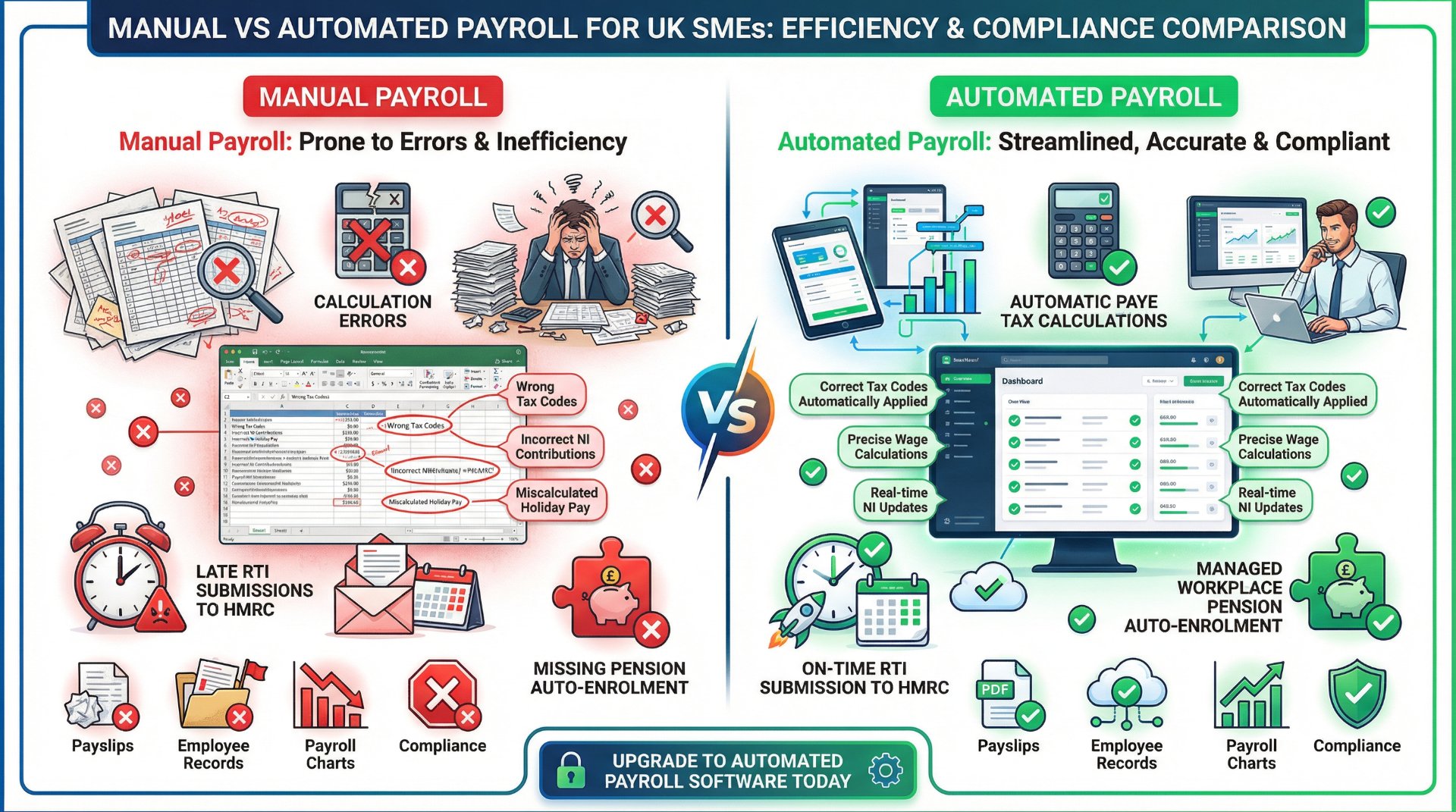
Every single mistake in this article is either eliminated or dramatically reduced by using proper payroll software. That is not an opinion. It is the practical reality of how these errors happen and where they come from.
Tax codes
Software receives HMRC coding notices digitally and applies updated tax codes automatically, removing the risk of manual misapplication.
RTI submissions
Software submits the FPS directly to HMRC as part of every pay run. The submission happens automatically, so there is nothing to forget.
Calculations
Software calculates gross-to-net pay including tax, NIC, student loans, pension, and statutory payments using current rates and thresholds.
Auto-enrolment
Software assesses each employee's eligibility automatically, calculates contributions, tracks opt-outs, and flags re-enrolment dates.
Payment reminders
Software tracks what you owe HMRC each period and reminds you before the deadline. Some integrate with Direct Debit for fully automatic payment.
Record keeping
Software stores full payroll history digitally with automatic backups, satisfying HMRC's retention requirements without manual filing.
Year-end processes
Software guides you through year-end step by step, marks the final FPS, generates P60s, and flags P11D deadlines.
Ongoing compliance
Software updates automatically when HMRC changes rates, thresholds, or reporting rules, so you are always working with current figures.
Platforms like Sage Payroll are specifically designed for UK small businesses and handle all of these tasks as part of the standard payroll workflow. The software syncs with Sage Accounting, submits RTI directly to HMRC, manages auto-enrolment assessments, and stores complete payroll records digitally. For most small employers, the cost of payroll software is far less than the cost of a single HMRC penalty.
Payroll compliance calendar 2026–27
Knowing the key deadlines is half the battle. Here are the dates that matter most for UK employers in the 2026–27 tax year.
| Deadline | What needs to happen |
|---|---|
| On or before each pay date | Submit FPS to HMRC |
| 19th of each month (post) / 22nd (electronic) | Pay PAYE and NIC to HMRC |
| 19th of each month | Submit EPS if no FPS is due or to claim statutory payment recoveries |
| 5 April 2027 | End of tax year — final pay run and final FPS |
| 19 April 2027 | Final PAYE payment for the tax year (post) / 22 April (electronic) |
| 31 May 2027 | Issue P60s to all employees on payroll at 5 April |
| 6 July 2027 | Submit P11Ds and P11D(b) to HMRC for benefits in kind |
Your payroll compliance checklist
Every pay run
- Verify employee tax codes match the latest HMRC notices.
- Calculate gross pay, deductions, and net pay using current rates.
- Check National Minimum Wage compliance for all workers.
- Assess auto-enrolment eligibility for any new or changed employees.
- Submit FPS to HMRC on or before the payment date.
- Issue payslips to all employees on or before payday.
Every month
- Pay PAYE and NIC to HMRC by the 22nd (electronic) or 19th (post).
- Submit EPS if applicable.
- Pay pension contributions to your provider by the scheme deadline.
- Review any HMRC coding notice changes and apply them.
Every quarter
- Review payroll records for accuracy and completeness.
- Check auto-enrolment assessments are up to date.
- Confirm all HMRC payments have cleared and match your records.
Year-end (March to July)
- Run final payroll for the tax year and submit final FPS.
- Submit any final EPS adjustments.
- Issue P60s to all employees by 31 May.
- Prepare and submit P11Ds by 6 July if applicable.
- Update payroll software with new tax year rates and thresholds.
- Check auto-enrolment re-enrolment dates.
The cost of doing nothing
To put the risk in perspective, here is what a single year of payroll mistakes could cost a small business with 10 employees and a monthly PAYE liability of £4,000.
| Scenario | Potential cost |
|---|---|
| 3 late FPS submissions | £600 |
| 4 late PAYE payments at 1% | £160 |
| 1 NMW underpayment for 1 worker (£500 shortfall at 200%) | £1,000 penalty + £500 arrears |
| Late auto-enrolment compliance (30 days at £500/day) | £15,000 + £400 fixed |
| Late P60 issue (10 employees at £300 each) | Up to £3,000 |
| Worst-case total in a single year | Over £20,000 |
Compare that to the annual cost of payroll software — typically £100 to £300 per year for a small business — and the calculation is obvious. The software does not just make payroll easier. It makes payroll fines almost entirely avoidable
The bottom line: HMRC payroll penalties are not random. They follow predictable patterns tied to specific mistakes. Every mistake in this article is preventable with the right process and the right software. The businesses that avoid fines are not the ones that know more about tax law. They are the ones that automated the tasks where human error causes the most damage.