Sage Accounting for UK SMEs: A Complete Operational Playbook
A complete implementation framework for UK SMEs using cloud accounting, VAT workflows, and practical finance controls.
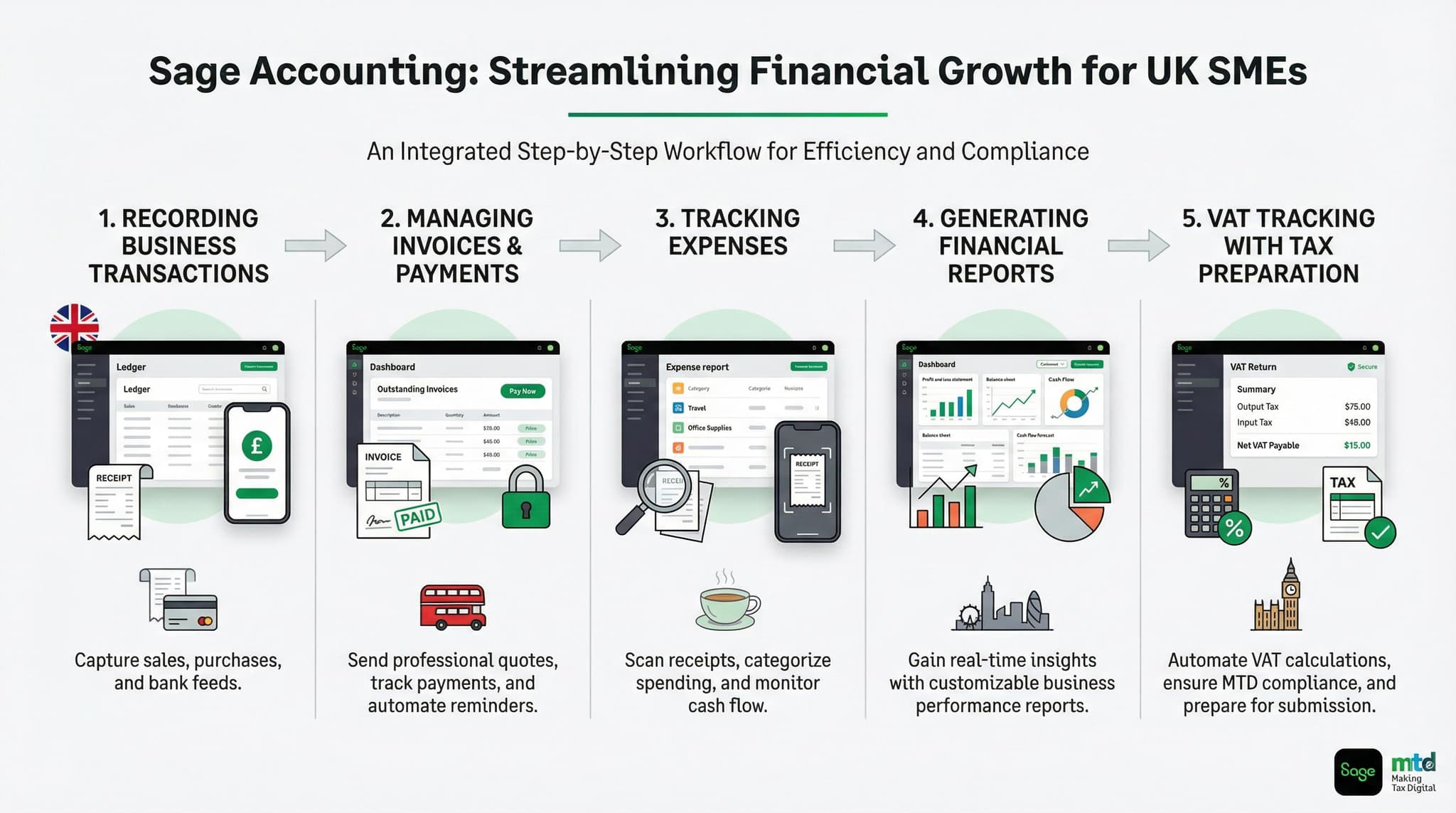
Sage Accounting for UK SMEs: A Complete Operational Playbook
Sage Accounting is positioned as a cloud accounting platform for UK small businesses, but the real value of the product is not simply that it lives online. Its real value is operational. When implemented properly, Sage Accounting becomes the financial control layer for an SME — the place where invoices are raised, expenses are captured, bank activity is matched, VAT is reviewed, reporting is generated, and collaboration with accountants becomes continuous instead of seasonal.
That distinction matters because many businesses buy cloud software but still run finance like a desktop era process. They upload receipts late, review bank data irregularly, leave VAT until the filing deadline, and rely on one person to clean up the books at month-end. In that model, the software is present, but the operating system is still manual. The businesses that get the most out of Sage are the ones that redesign the workflow around real-time capture, recurring review, clear ownership, and software-led discipline.
This playbook explains how UK SMEs should think about Sage Accounting as an operational platform rather than just an accounting subscription. It covers what the product includes, how the plans differ, how to structure finance workflows inside the system, where businesses usually fail in implementation, and how to turn Sage into a dependable finance operating model for growth.
What Sage Accounting is designed to do
Sage describes Sage Accounting as a cloud software solution that can be accessed online anywhere, anytime, with no software installation required. It is built for small businesses that want to manage accounting, stay on top of taxes, and collaborate more easily with others and with their accountant. Because the product is hosted online, it supports browser access and mobile access without depending on one office computer or local file structure.
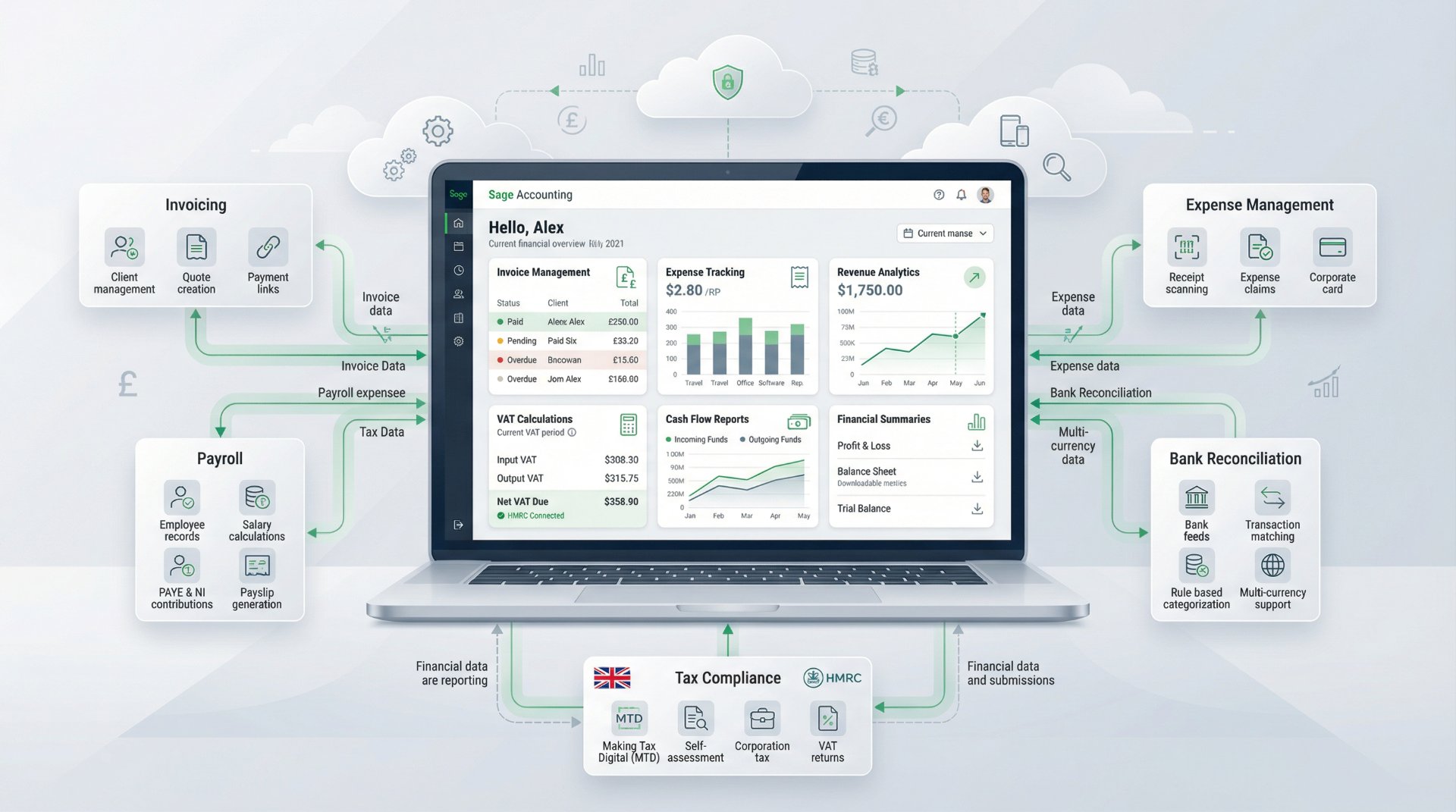
That cloud model changes the operating rhythm of finance. Bookkeeping no longer needs to happen from a specific desk at a specific machine. A director can review dashboards remotely. A bookkeeper can capture invoices continuously. An accountant can log in without asking for backups. Work completed on one device updates across the others, which helps reduce lag between activity and visibility.
Sage also positions the product as suitable for businesses that want to simplify tax administration, especially VAT and Self Assessment preparation. That makes it particularly relevant for UK SMEs that need software not only for bookkeeping but also for day-to-day compliance readiness.
Plans and commercial structure
Sage Accounting is offered in three plans: Start, Standard, and Plus. Sage states that all three plans include the fundamental features needed to manage accounting, that pricing excludes VAT, and that businesses can upgrade, change, or cancel plans at any time. The current standard monthly prices are £18 for Start, £39 for Standard, and £59 for Plus, after the introductory offer period.
| Plan | Price | What stands out operationally |
|---|---|---|
| Accounting Start | £18 + VAT / month | Core accounting features, 1 Copilot user included, suitable for smaller businesses with lighter complexity. |
| Accounting Standard | £39 + VAT / month | Everything in Start plus 30 approved invoice/receipt captures, stronger workflow depth for growing SMEs. |
| Accounting Plus | £59 + VAT / month | Everything in Standard plus 100 approved captures, stronger scale for businesses processing more documents and users. |
The plan structure is simple compared with many accounting platforms, and that is an advantage. Rather than overwhelming businesses with too many product paths, Sage keeps the commercial decision relatively clear. Start is for simpler operations, Standard is the practical growth tier, and Plus is the scale tier for businesses that need more volume and more workflow headroom.
Core capabilities that matter for SMEs
Operationally, the strongest parts of Sage Accounting are not abstract finance features. They are the capabilities that reduce friction in daily work: cloud access, digital document storage, VAT handling, imports, collaboration, and AI-supported productivity. These are the features that change how the finance function actually runs.
Cloud access
Sage Accounting runs online and works across devices, including browser access plus mobile apps for iOS and Android. This makes it easier to run finance from multiple locations without depending on one machine.
Digital archive
Sage includes a digital archive for receipts and invoices. Standard includes 30 approved captures and Plus includes 100, with additional captures available in-product.
VAT compliance
Sage supports MTD- and HMRC-compatible VAT workflows, direct submission to HMRC, monthly VAT snapshots, and previous submission history.
Flexibility
Businesses can collaborate with others, grant accountant access, import chart of accounts and bank statements, and change plans as requirements evolve.
Sage Copilot and AI in the daily workflow
Sage places significant emphasis on Sage Copilot, its AI-powered productivity assistant built around the needs of British businesses. One Copilot user is included in all Sage Accounting plans, with additional users available in Standard and Plus. In practical terms, this matters less as a marketing feature and more as a productivity layer: the system is designed to help users stay informed, proactive, and more efficient inside the accounting workflow.
For SMEs, the real benefit of embedded AI is not novelty. It is time compression. If the software can automate admin, surface insights, reduce manual review work, and support faster follow-up on issues like unpaid invoices or reporting gaps, finance becomes lighter to operate. That is especially valuable in smaller companies where one person may be handling bookkeeping alongside broader operational responsibilities.
That said, AI only creates real value when the underlying records are clean. If transactions are coded poorly, source data is late, or workflows are inconsistent, AI features become less useful. The best results come when businesses combine strong bookkeeping discipline with the productivity gains Sage Copilot is meant to provide.
VAT and HMRC readiness
For many UK SMEs, VAT is the point where accounting software stops being optional and starts becoming infrastructure. Sage explicitly positions its VAT functionality as MTD- and HMRC-compatible. The platform allows users to choose VAT rates, define how VAT is applied, run reports, and submit VAT returns online directly to HMRC in just a few clicks. Sage also says it keeps a monthly snapshot of the current VAT position and a record of previous submissions.
These features are important because VAT compliance is not just about filing on time. It is about maintaining a reliable digital workflow from source transaction to tax return. Sage supports the most common VAT schemes in the UK, including Standard, Cash-based, Flat Rate, and Flat Rate Cash-based, which gives SMEs a reasonable level of flexibility without forcing them into spreadsheet-heavy workarounds for normal scenarios.
Operationally, the best use of Sage VAT functionality is to review the VAT position monthly, not quarterly. When businesses wait until the filing deadline, VAT becomes stressful. When they use monthly snapshots and regular coding review, VAT becomes more predictable, more accurate, and far easier to plan for in cash flow terms.
Payroll and adjacent finance workflows
One important point for buyers is that Sage Payroll is not included natively inside the base Sage Accounting subscription as a built-in universal feature. Sage describes Sage Payroll with HR features as an optional add-on to Sage Accounting that syncs automatically with it. That means businesses planning an end-to-end finance and payroll workflow should evaluate the accounting plan and payroll add-on together rather than assuming payroll is automatically part of every accounting subscription.
This is not a weakness so much as a planning issue. For a business with employees, payroll should be treated as part of the operating design from day one. If payroll will sit alongside accounting, define how data flows, who owns payroll processing, how journals are reviewed, and how payroll liabilities are monitored. The value of integration comes not simply from buying both products, but from aligning them as one process.
For director-only businesses or early-stage SMEs without employees, the optional structure is actually useful because it avoids paying for payroll complexity too early. But for growing teams, payroll should become part of the Sage operating model before headcount growth creates manual friction.
Migration and onboarding
Sage’s onboarding position is stronger than many SMEs realise. The company says businesses can import chart of accounts, contacts, services, bank statements, and more using CSV templates and expert support. Sage also says it can support migration with up to two years of transactional data from the previous accounting system, along with customer and supplier lists and other core records.
This matters because migration quality determines whether a cloud accounting implementation starts cleanly or begins with confusion. A rushed migration often leaves bad nominal mappings, inconsistent contacts, uncleared balances, or historical records sitting outside the live workflow. A structured migration, by contrast, gives the business a usable baseline from which dashboards, VAT, bank reconciliations, and reporting all become trustworthy much faster.
The operational rule is simple: do not migrate data just to populate the system. Migrate data so the system can actually run the business. That means checking customer records, supplier lists, opening balances, VAT setup, bank feeds, user permissions, and reporting structure before the system becomes the live source of truth.
The SME operating blueprint
The most effective way to use Sage Accounting is as a weekly operating rhythm rather than a month-end tool. Finance quality improves when routines are spread across the month rather than deferred into one accounting “catch-up” day.
1. Capture documents at source
Receipts, supplier invoices, and sales documents should enter Sage close to the transaction date. This keeps the digital archive current and reduces month-end backlog.
2. Keep bank feeds active and reviewed
Bank data should be reviewed continuously, not only before reporting or VAT deadlines. Frequent reconciliation creates cleaner books and stronger cash visibility.
3. Review debtors and invoices weekly
If Sage is being used to help get paid faster, invoice status and overdue follow-up should be reviewed every week, not treated as an occasional admin task.
4. Run a monthly VAT and liability check
Use the VAT snapshot and management view every month so tax obligations are visible before quarter-end and before cash becomes tight.
5. Close the month with discipline
Review reconciliations, outstanding expenses, payroll journals where relevant, accruals, VAT reasonableness, and reporting accuracy before using the numbers operationally.
6. Give the accountant live access
The accountant should not be treated as a year-end clean-up service. Shared system access allows review, correction, and advisory input throughout the year.
Where businesses usually fail with Sage
Most implementation failures are not caused by the platform itself. They come from weak habits being transferred into new software. A business buys Sage Accounting but still waits until month-end to upload receipts. It connects bank feeds but does not reconcile regularly. It has VAT capability but only reviews tax at the deadline. It grants accountant access but still sends spreadsheets around by email. In those cases, the software is modern but the operating behaviour is not.
Another common problem is unclear ownership. Cloud accounting works best when everybody knows their role: who raises invoices, who captures expenses, who reviews reconciliations, who monitors VAT, who closes the month, and who approves adjustments. Without that clarity, tasks drift and the system becomes a storage place rather than a management tool.
The third failure is underusing the system’s structure. Features like digital archives, shared access, imports, VAT reporting, and AI support only create value when they are embedded into routine. The software should be the workflow. If the real workflow still happens in email threads, WhatsApp messages, and off-system spreadsheets, the value of Sage drops sharply.
Who should choose which plan
Choose Start if your business
- Has relatively straightforward accounting needs and low document volume
- Needs cloud access, core bookkeeping, and tax readiness without heavier workflow volume
- Is early-stage or owner-managed with limited internal finance complexity
- Wants a low-friction entry point into the Sage ecosystem
Choose Standard if your business
- Is growing and needs stronger daily workflows, especially around document capture and review
- Wants the most practical balance of cost and operating depth for an SME finance function
- Works closely with an accountant and needs a cleaner ongoing workflow rather than quarterly catch-up
- Needs a more scalable structure for managing invoices, expenses, VAT, and reporting together
Choose Plus if your business
- Processes a higher volume of invoices and receipts
- Needs more operational headroom for finance administration and collaboration
- Wants the strongest plan available before moving into a more advanced Sage product later
- Plans to build a more mature digital finance process without stepping into full ERP complexity yet
How Sage fits into the wider growth path
One of Sage Accounting’s strengths is that it does not sit alone. It is part of a broader Sage ecosystem, which means SMEs do not need to view it as a dead-end product. A small business can begin with Sage Accounting, add payroll where needed, deepen document and tax workflows, and later evaluate more advanced Sage systems as complexity grows.
That growth path matters strategically. SMEs often hesitate to commit to a finance platform because they worry about outgrowing it. The better way to think about Sage Accounting is as the cloud foundation layer for an early-stage or growth-stage operating model. If a business later needs heavier operational depth, multi-entity capability, or ERP-level workflows, the migration path is more coherent when it begins inside the same ecosystem.
In the meantime, the objective is not to over-buy. It is to run the present business well. For many UK SMEs, Sage Accounting is the right level of sophistication precisely because it combines practical compliance, cloud access, and workflow discipline without unnecessary complexity.
Final perspective
Sage Accounting is not just a bookkeeping tool for UK SMEs. Used properly, it is a finance operating platform. Its value comes from how it structures daily work — cloud access, live collaboration, digital document storage, VAT workflows, imports, mobile continuity, and AI-supported productivity all help finance move from reactive admin toward continuous control.
The businesses that get the most from Sage are not necessarily the ones with the most complex finance function. They are the ones that use the product with operational intent. They capture transactions early, reconcile often, review VAT monthly, involve the accountant continuously, and let the software become the source of truth for day-to-day decision-making.
That is the real playbook. Not just buying cloud accounting, but building the business around cleaner financial workflows. When UK SMEs do that with Sage Accounting, the product becomes far more than a subscription. It becomes part of how the company runs.